
MTMIS Punjab – Check Vehicle Verification Online in Minutes
MTMIS Punjab is the online vehicle verification system of the Punjab Excise, Taxation and Narcotics Control Department. Type a registration number into the portal, and it shows the owner’s name, engine and chassis numbers, registration date, and token tax status within seconds.
That single check has saved countless buyers from bad deals. Yet most people still hand over a deposit for a used car before ever opening the portal. This guide fixes that. We explain how the system works, what every field on the result page means, and what to do when a vehicle refuses to show up.
What Is MTMIS Punjab?
MTMIS stands for Motor Transport Management Information System. It is a centralized database of every vehicle registered in Punjab, built by the Punjab Information Technology Board (PITB) for the Excise and Taxation Department.
Before this system existed, checking a vehicle’s record meant a trip to the district Excise office, a paper form, and often a full day of waiting. Now the same record opens on your phone. Moreover, the database covers every vehicle class: motorcycles, rickshaws, private cars, commercial vans, trucks, buses, and even agricultural tractors.
The purpose behind the system is simple. Punjab has one of the largest used-vehicle markets in Pakistan, and open records make that market safer. When anyone can confirm who owns a car, stolen vehicles become harder to sell. As a result, fraud drops and honest sellers close deals faster.
How to Check Vehicle Verification in Punjab (Step by Step)
The whole process takes less than a minute. Here is exactly what to do:
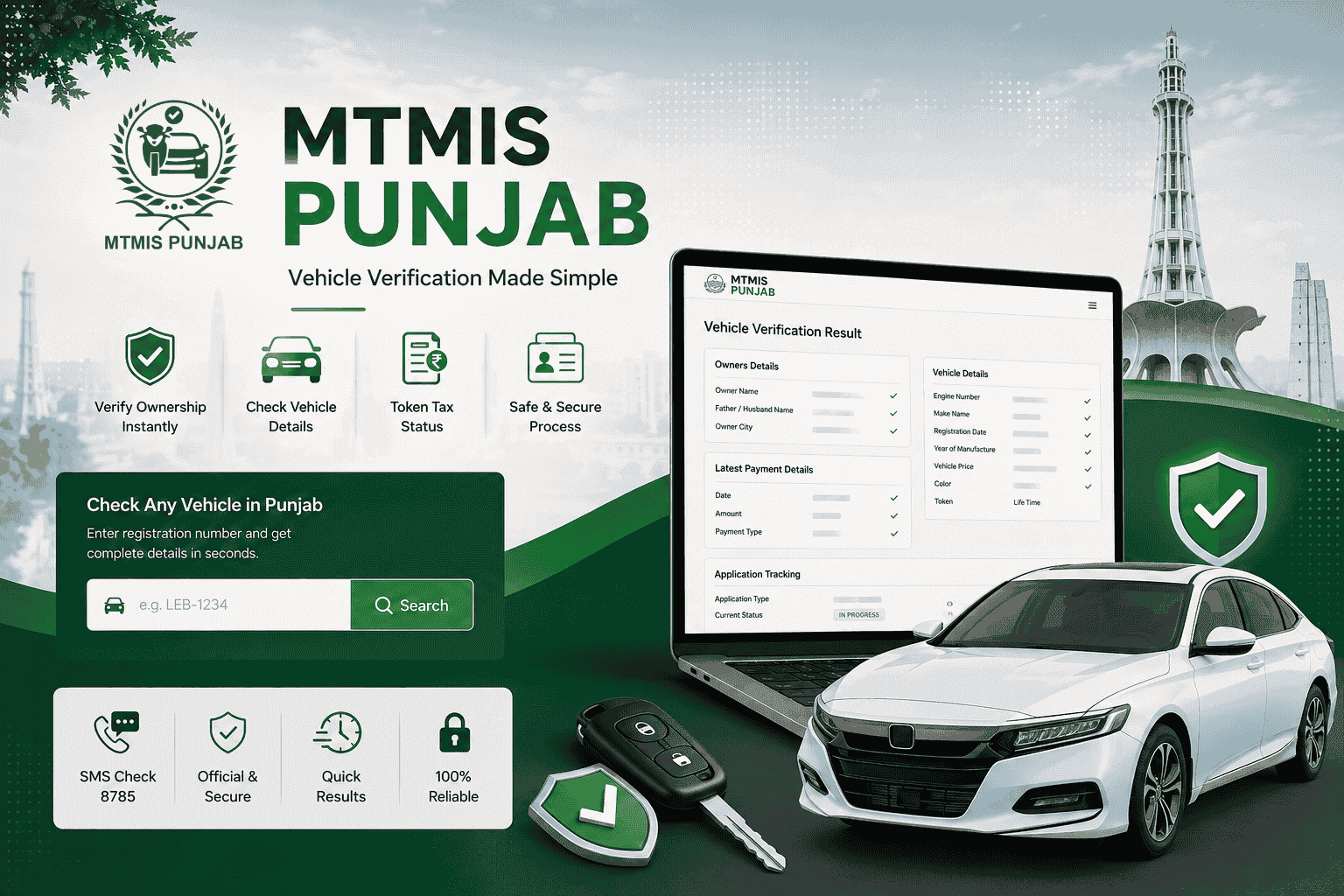
- Open the official MTMIS Punjab portal at mtmis.excise.punjab.gov.pk.
- Enter the vehicle’s registration number in the search box. Try the format printed on the number plate first, for example LEB-1234 or LE-14-7890.
- Complete the captcha to prove you are human.
- Press the search button.
- Read the result page. It lists the owner’s name, vehicle details, and tax record.
If the first format returns nothing, don’t give up. Punjab plates follow several patterns, so a number like LEB 1234 might be stored as LEB-1234 or LEB1234. In our experience, trying two or three combinations resolves most "not found" results.
Check Vehicle Details by SMS (Short Code 8785)
No internet? There is an offline route too. Send the registration number by SMS to 8785, and the system replies with the vehicle’s basic record. Standard SMS charges apply, and the reply usually arrives within a minute or two.
The SMS method suits quick roadside checks — for instance, when you are standing in a Sunday car bazaar and want a fast answer before negotiating. For the complete record, however, the web portal remains the better option.
What Details Does MTMIS Punjab Show?
A successful search returns four groups of information. Here is what each one contains and why it matters:
| Section on result page | Fields shown | Why it matters to you |
|---|---|---|
| Owners Details | Owner name, father’s/husband’s name, owner city | The seller’s CNIC name should match this record exactly. If it doesn’t, ask why before paying anything. |
| Latest Payment Details | Date, amount, payment type | Shows the last transaction on the record — and whether the tax trail is current. |
| Vehicle Details | Engine number, make, registration date, year of manufacture, vehicle price, color, token | Match these against the physical vehicle. Any mismatch is a red flag. |
| Application Tracking | Application type, current status | Tells you whether a registration or transfer is complete or still in process. |
That is the quick overview. Now let’s walk through a real result, because several of these fields confuse first-time users — and two of them can save you real money.
We recently verified a newly registered motorcycle — a 2026 Honda CD-70 from Kharian — and the portal returned every field below. Here is what each one actually tells you.
Owners Details: The Identity Check
Three fields appear here: the owner’s name, the father’s or husband’s name, and the owner’s city. Always check all three together. Names repeat constantly in Pakistan, so the father’s name is your second lock on the seller’s identity — it should match the parentage line on their CNIC.
One common confusion: the city shown is the district of registration, not the owner’s current address. A Kharian-registered bike being sold in Lahore is perfectly normal. A seller whose CNIC name differs from the owner field is not.
Latest Payment Details: The Money Trail
This section shows the date, amount, and type of the most recent payment on the record. On our example bike, it read 09-Jun-2026, Rs. 5,300, type "NEW REGISTRATION" — meaning the registration fee itself was the last transaction.
The payment type field is the one to read carefully. It might say NEW REGISTRATION, TOKEN TAX, or TRANSFER. Consequently, it tells you the last thing that officially happened to this vehicle. An old payment date on a years-old vehicle usually points to unpaid token tax — which becomes your bill after purchase.
Vehicle Details: Match Everything Physically
This is the largest section, and every field earns its place:
- Engine number. Match it against the engraving on the vehicle itself, not just the documents. A ground-off or mismatched engine number ends the deal, full stop.
- Make name. Shown as brand and model, for example HONDA – CD 70.
- Registration date vs. year of manufacture. These can legitimately differ. However, a vehicle manufactured in 2024 but registered in 2026 sat unsold or unregistered for two years — worth asking about, and it affects resale value.
- Vehicle price. This is the declared value at registration, used for tax calculation — Rs. 159,900 for our example CD-70. It is usually below market price, so treat it as a tax reference, not a valuation.
- Color. If the record says RED and the vehicle in front of you is black, it has been repainted. Repaints happen for honest reasons, but they also hide accident damage. Ask.
- Token. For most motorcycles, this shows "Life Time", because Punjab charges bikes a one-time lifetime token tax at registration. Cars, by contrast, pay annually — so their record shows the latest paid period instead.
Vehicle Application Tracking: Is the Paperwork Finished?
The final section shows the application type and its current status. Our example read "NEW REGISTRATION — IN PROGRESS", which simply means the number plate and smart card were still being processed.
This matters most when buying. If you are purchasing a vehicle whose transfer or registration shows IN PROGRESS, understand exactly which step is pending before money changes hands. A completed status is always the cleaner position.
One last detail worth noticing: the result page itself carries a footer stating the information can be verified on the official Excise portal. Take a screenshot of the full result whenever you verify a vehicle you intend to buy. It gives you a dated record of what the system showed at the time of the deal, which can help if a dispute appears later.
Why Vehicle Verification Matters Before You Buy
Here is a situation we hear about far too often. A buyer finds a clean-looking car at a tempting price. The seller has the original book, the file looks complete, and the deal closes the same evening. Weeks later, the buyer discovers unpaid token tax stretching back three years — or worse, an ownership record that names a complete stranger.
A sixty-second vehicle verification would have surfaced every one of those problems. Specifically, running the number through MTMIS protects you from four risks:
- Stolen or tampered vehicles. If the engine and chassis numbers on the result page don’t match the car in front of you, walk away.
- The "open letter" trap. Punjab’s market is full of vehicles sold on open transfer papers, sometimes across several owners. The registered owner on record may be two or three sales behind, which complicates any future transfer.
- Hidden tax dues. Outstanding token tax follows the vehicle, not the previous owner. Consequently, whatever is unpaid becomes your bill.
- Blacklisted records. Vehicles flagged over legal or financial disputes cannot be transferred until the issue clears.
Furthermore, verification protects sellers too. Showing a buyer the live record builds instant trust and usually shortens the negotiation. Honest sellers have everything to gain from an open database.
More Excise Services You Can Use Online
Vehicle verification is the most used feature, but the Excise ecosystem now covers much more. Each service below has its own detailed guide on this site.
Token Tax Check and Payment
Every registered vehicle owes an annual token tax. The MTMIS record shows whether it has been paid, while the e-Pay Punjab app lets you clear it from your phone. Pay the full year before 30 September and you earn a 10% rebate, with a further 5% discount for paying through e-Pay. Our token tax rates page keeps the current year’s full schedule in simple tables.
Smart Card (E-Registration Card) Status
Punjab has replaced the old registration book with a chip-based smart card. After a new registration or transfer, you can track your card’s printing and delivery status online. The card carries a QR code, so traffic police can confirm your record on the spot.
E-Challan Check
Safe City cameras in Lahore, Rawalpindi, Multan, and Faisalabad issue automated challans for traffic violations. You can check pending challans against your registration number and pay them online. Unpaid challans can block your vehicle’s transfer, so it is worth checking before any sale.
Application Tracking
Submitted a transfer or fresh registration? Enter your application number and chassis number on the portal to see which phase your file has reached. This beats calling the Excise office and waiting on hold.
Which Cities Does MTMIS Punjab Cover?
All of them. This confuses many first-time users, so let’s clear it up. There is no separate MTMIS Lahore, MTMIS Rawalpindi, or MTMIS Faisalabad system. One provincial database covers every district, from Attock to Rahim Yar Khan.
The city prefix on a number plate simply tells you where the vehicle was first registered. A car with a Multan registration checks out on the same portal as a car from Gujranwala. However, vehicles registered in Islamabad, Sindh, KPK, or Balochistan live in different systems, because each region maintains its own records. We have a separate guide comparing those systems if you are checking a non-Punjab vehicle.
Common Problems and Quick Fixes
The portal works well most days, but a few issues come up again and again. Here is how to handle each one:
- "Vehicle not found." Usually a formatting issue. Try the number with and without dashes, and with the year segment if the plate has one. If nothing works, the vehicle may be very recently registered or recorded in another province.
- Owner’s name looks outdated. The database shows the last completed transfer. If a sale happened on an open letter and was never registered, the old owner’s name remains. Only a formal transfer at the Excise office updates it.
- New vehicle not appearing. Fresh registrations can take some days to reflect. Check again after a week before assuming something is wrong.
- Portal not loading. Traffic spikes happen, especially near tax deadlines. Try the SMS method on 8785, or check again during off-peak hours.
- Wrong details in your own record. Visit your district Excise and Taxation office with your original documents and request a correction. Online forms cannot fix database errors yet.
Frequently Asked Questions
How can I check who owns a vehicle in Punjab?
Enter the registration number on the MTMIS Punjab portal and complete the captcha. The result page shows the registered owner’s name, their father’s or husband’s name, and the city of registration, along with the vehicle’s full record.
Is MTMIS Punjab vehicle verification free?
Yes. Checking a vehicle on the web portal costs nothing, and you can run as many searches as you need. Only the SMS method carries standard message charges, and official services such as transfers involve government fees.
Can I check a vehicle by CNIC number?
The public portal is built around registration-number searches, not CNIC lookups. If you need a list of vehicles registered against your CNIC, contact your district Excise office through official channels, since ownership-wide searches are restricted to protect privacy.
Can I verify a motorcycle on MTMIS Punjab?
Yes. The database covers every vehicle class registered in Punjab, including motorcycles and rickshaws. Enter the bike’s registration number exactly as it appears on the plate, and try a couple of format variations if the first attempt fails.
What is the SMS code for vehicle verification in Punjab?
Send the registration number to 8785. The reply includes the vehicle’s basic registration details. Standard SMS charges apply, which makes this the handiest option when you have no internet access.
Does MTMIS Punjab work for Islamabad or Karachi vehicles?
No. It only covers vehicles registered in Punjab. Islamabad vehicles are checked through the Islamabad Excise system, while Sindh maintains its own MTMIS for Karachi and other cities. Each province runs a separate database.
What should I check before buying a used car in Punjab?
Verify the registration record on MTMIS, match the engine and chassis numbers physically, confirm the seller’s CNIC against the owner record, check token tax and e-challan dues, and insist on a proper transfer rather than an open letter.
Why does the portal show the previous owner’s name?
Because the last transfer was never completed at the Excise office. Open-letter sales leave the record unchanged. The name updates only after a formal ownership transfer, including biometric verification, is processed.
A Quick Word Before You Go
Vehicle verification in Punjab used to be a chore. Today it takes a minute, costs nothing, and removes most of the risk from buying or selling a vehicle. Run the check every single time — before the test drive, before the token money, and certainly before the transfer.
Bookmark this page, and explore our detailed guides on token tax rates, smart card tracking, and e-challan payments whenever you need the next step. If something on the portal changes, we update our guides quickly, so you will always find the current process here.
Have a question or found outdated info? Contact Us — or learn more About Us and how we keep this guide accurate.